A check-in somebody answers for, and an alarm when nobody does
A community nurse on a home visit. A fitter going into a switch room. A caretaker doing a night lock-up. They arm a check-in before they start, the deadline sits on the server rather than on the phone, and when the check-in does not come the platform raises the alarm on their behalf.
Most organisations buy this twice
One system for duress, because somebody needs a panic button. Another for check-ins, because somebody else works alone in a plant room or drives to a client's house. Two apps on the same phone, two consoles, two rosters, two sets of after-hours arrangements, and two chances for the wrong one to be the one that fails.
They are the same requirement. A worker who presses duress and a worker who fails to check out of a visit both need the same thing: somebody who knows, quickly, where they were meant to be and what they were meant to be doing, on a path that does not quietly stop working.
WillowCreek treats them as one problem. One app, one alarm path, one control room, one escalation ladder, one set of responders, one audit trail. Lone worker is not a separate product, a separate app or a separate console from mobile duress. It is the same platform doing the other half of the job.
The sentence that decided every design question here: a welfare system that stops watching without saying so is worse than none.
A person changes their behaviour on the strength of it. They go into the plant room, or knock on the door, believing somebody will come if they do not come back out. If the thing that was watching them has quietly stopped, nobody in the control room has any reason to look, and the worker has no way to know.
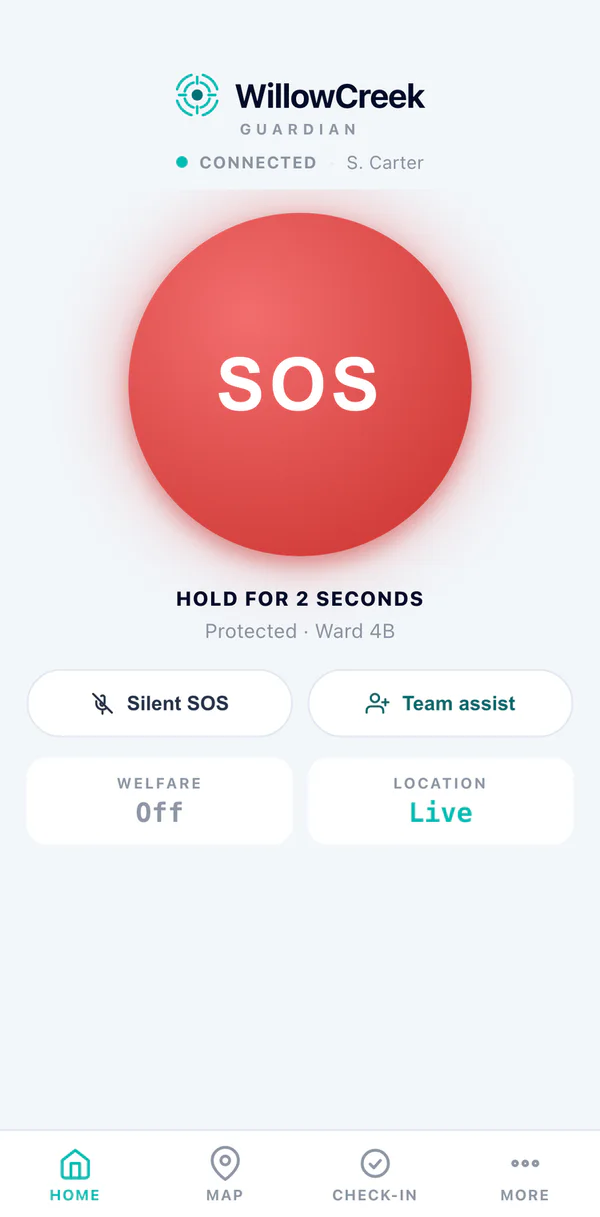
How a visit runs
Arriving is starting the timer with the address and the activity on it. Leaving is finishing it. Running late is extending it. Missing it is an alarm somebody else has to answer.
On arrival
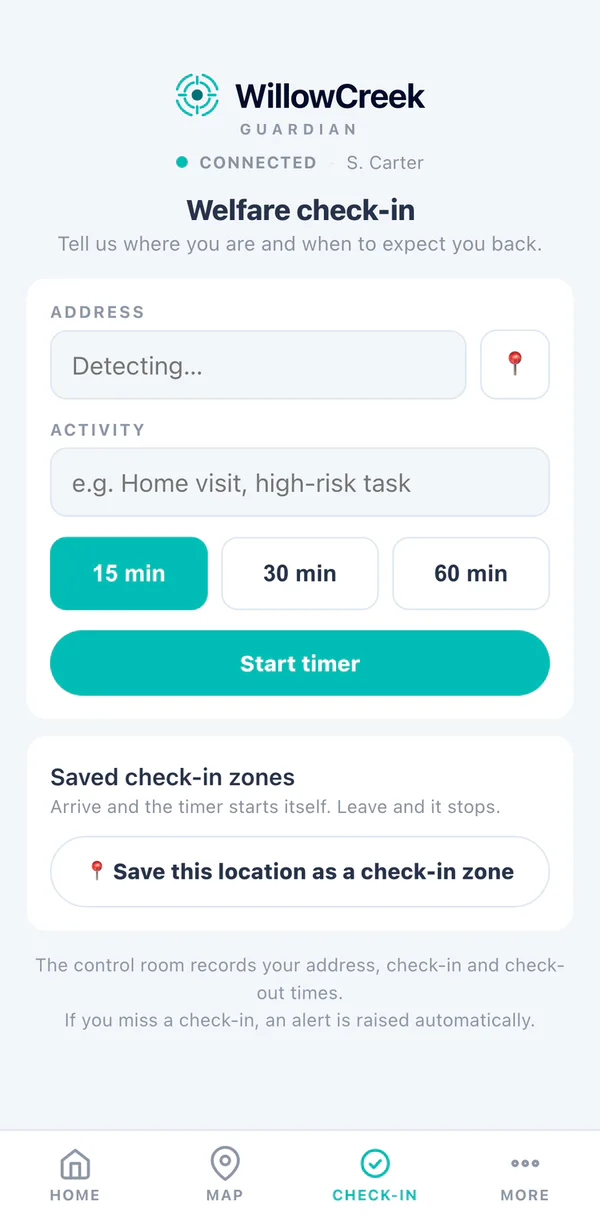
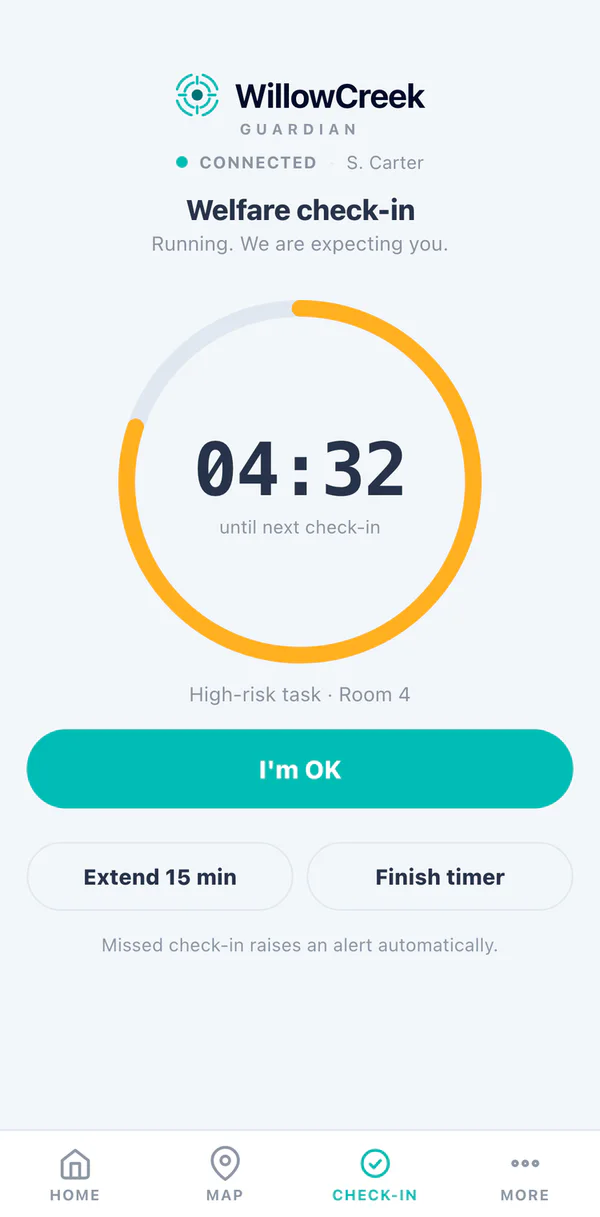
The worker opens the app, says how long they expect to be, and names where they are and what they are doing. The app shows a countdown. That is the check-in.
Behind it
A record now exists with a deadline on it. The countdown on the phone is a picture of that deadline, not the thing itself. Nobody's safety depends on the phone continuing to work.
Running late
One tap adds time, or restarts the window. Each is recorded individually, with a timestamp and who did it.
On leaving
The worker stands the timer down. Nothing was wrong, and the record says so. That is the check-out.
Or the deadline passes
The platform raises a lone worker alarm on the worker's behalf, because by then they cannot raise one themselves. The alarm carries where they said they were, what they said they were doing, when they armed it, when they last checked in, and how many times.
Or the phone goes quiet
Under a running timer, a device that has not been heard from for a nominated window raises on its own, without waiting for the deadline. An unreachable person cannot confirm they are safe, and "we could not ask" is not "they are fine".
The three ways a check-in can be required
Different work needs different patterns, so there are three, and they can run together.
The visit timer
Armed by the worker, on themselves, before a task. Suits home visits, community nursing, an after-hours attendance at a remote site, a maintenance job in a plant room. The worker states where they are going and what they are doing when they arm it, because that text is the single most useful thing in the alarm when it fires.
The recurring schedule
Set by a supervisor against a named person. Prompt every so many minutes, between nominated hours, on nominated days, with a grace window on each prompt. It names the person it watches and cannot be pointed at "everyone", because a schedule fanned across a roster the platform does not hold will eventually prompt somebody who is not on shift.
The operator "are you OK"
A supervisor or operator asks one named person, right now, whether they are all right. If an operator pings somebody whose device has already gone quiet, the platform raises straight away rather than opening a window that could only ever expire. An operator can ask. An operator cannot answer, extend, cancel or stand down on somebody else's behalf.
| Pattern | Range | Set by |
|---|---|---|
| Visit timer | 1 minute to 24 hours | The worker, on themselves |
| Recurring schedule | Every 1 minute to 24 hours, within nominated hours and days | A supervisor, against one named person |
| Grace window on a prompt | 15 seconds to 60 minutes | Per schedule |
| Comms-lost window | Configurable, 60 seconds by default | Per site |
| Backstop sweep | Every 10 seconds | Fixed |
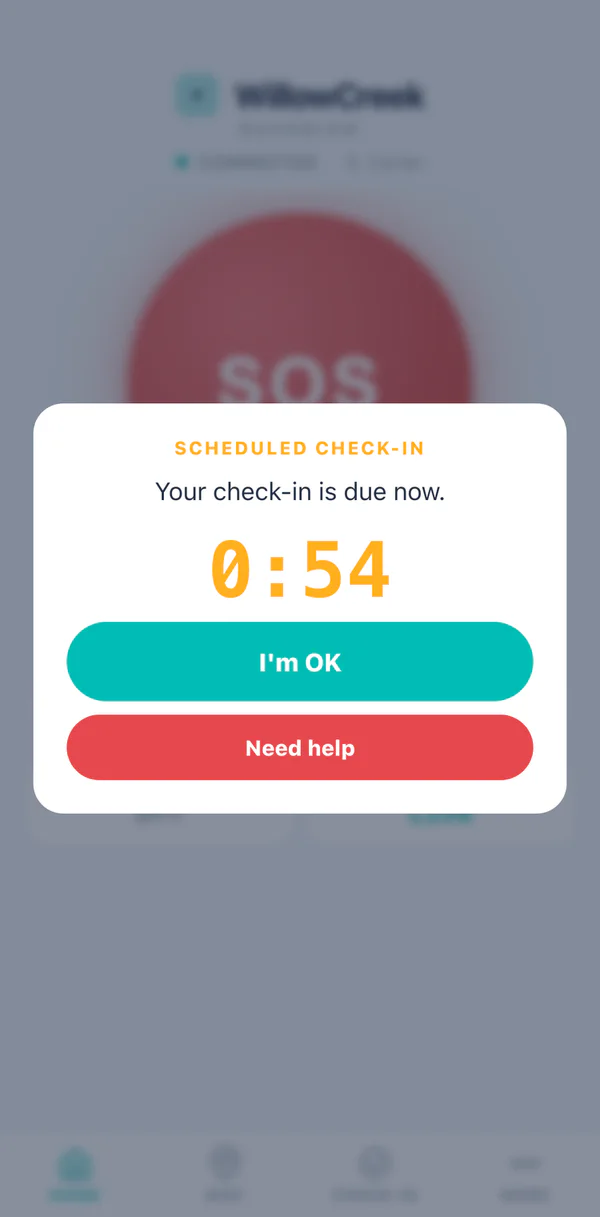
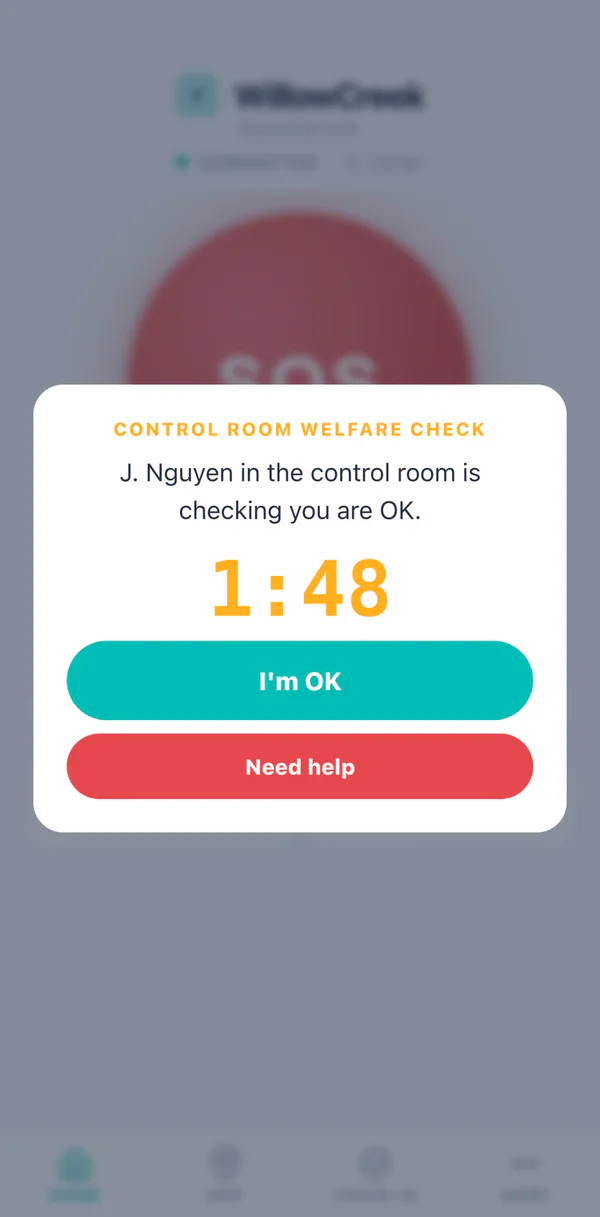
Need help is one press from every check-in prompt. A worker who has been asked whether they are OK and is not should not have to find a different screen to say so.
Where the alarm says the worker is, and what the control room can see
Three rungs, in that order, and the worker always knows which rung they are on. All three screens exist rather than just the good one, because the worker needs to know what the control room can and cannot see about them. That is a safety fact when they are deciding whether to rely on it, and a privacy fact the rest of the time.
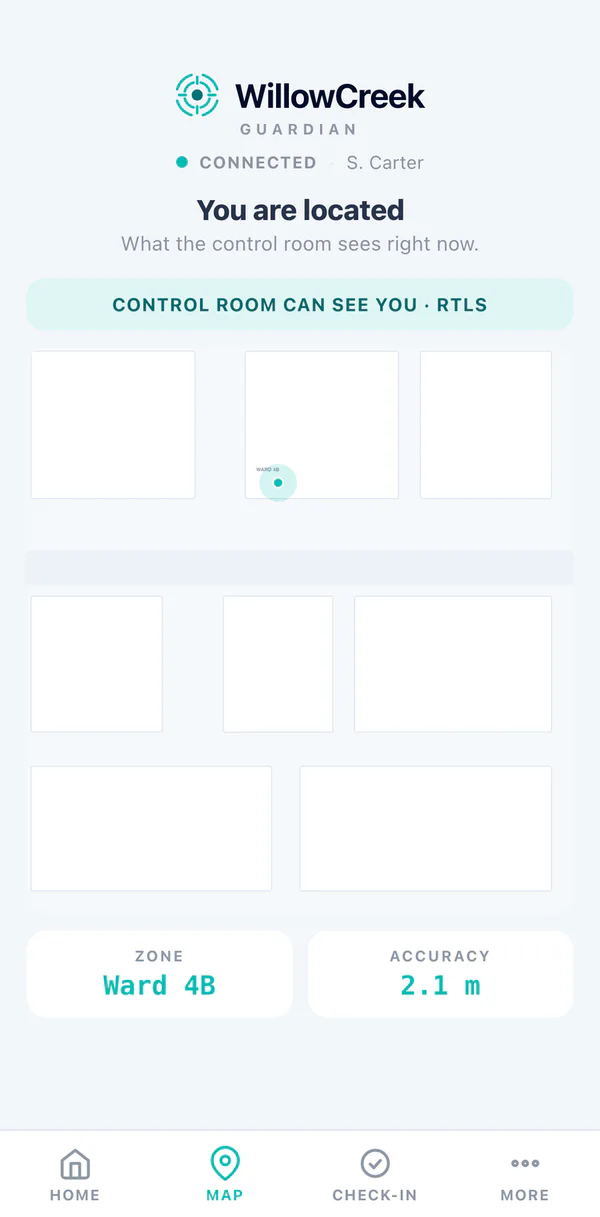
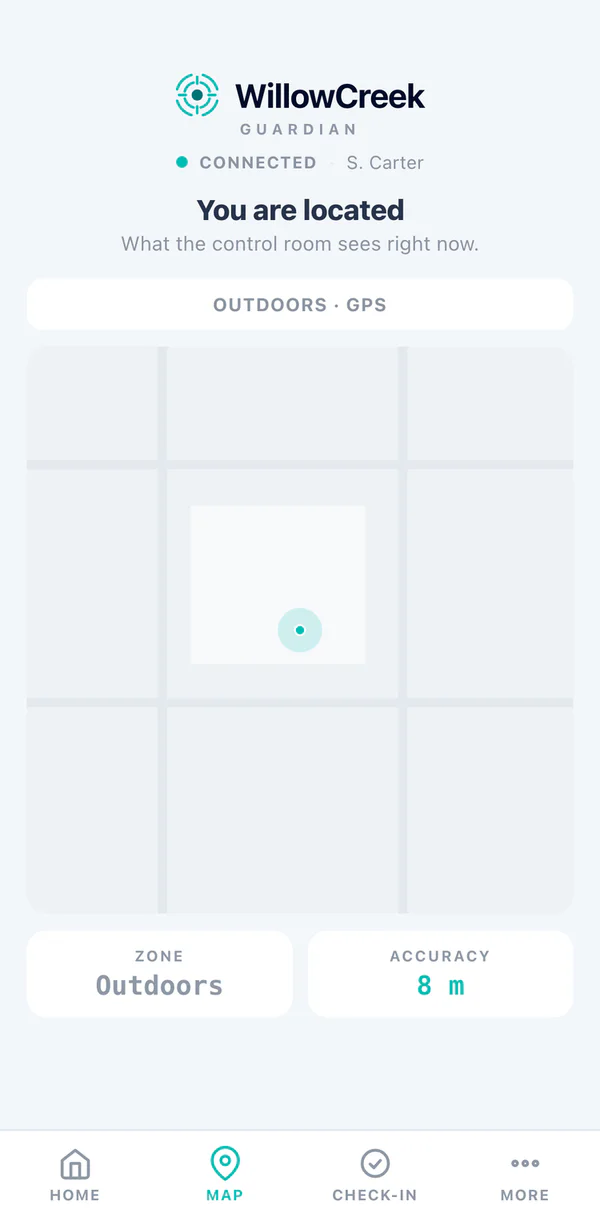
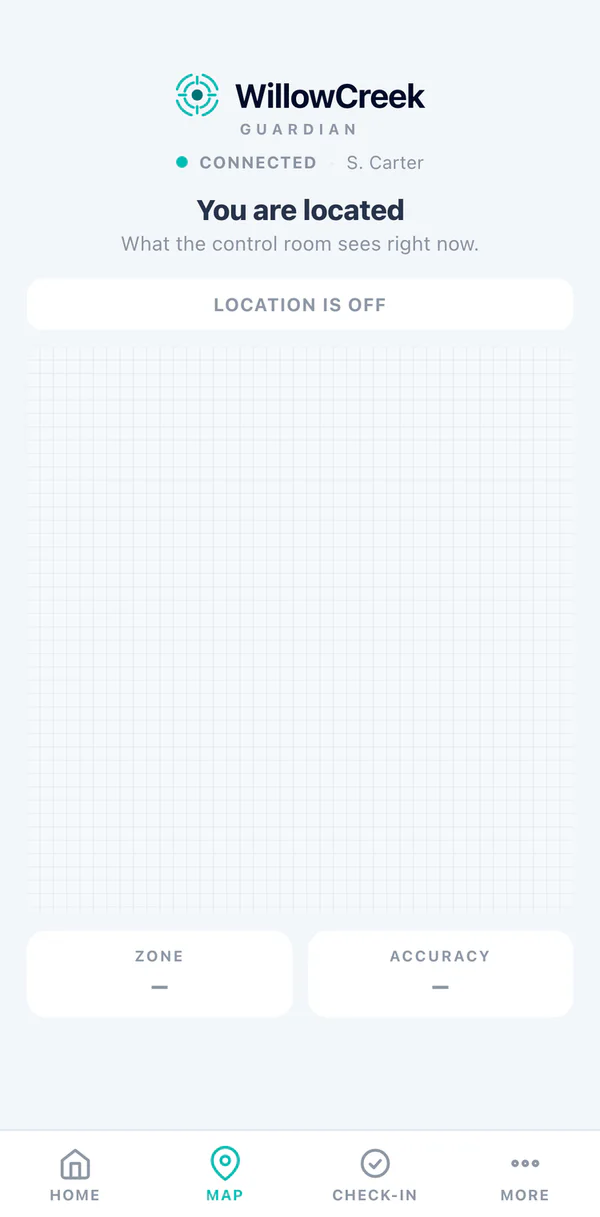
Sample data throughout. The figures on these screens are whatever the site's own positioning infrastructure reports at that moment, not a WillowCreek accuracy claim. Indoor position to the room comes from RTLS inside the customer's own buildings and does not apply at somebody's house. How the location engine works →
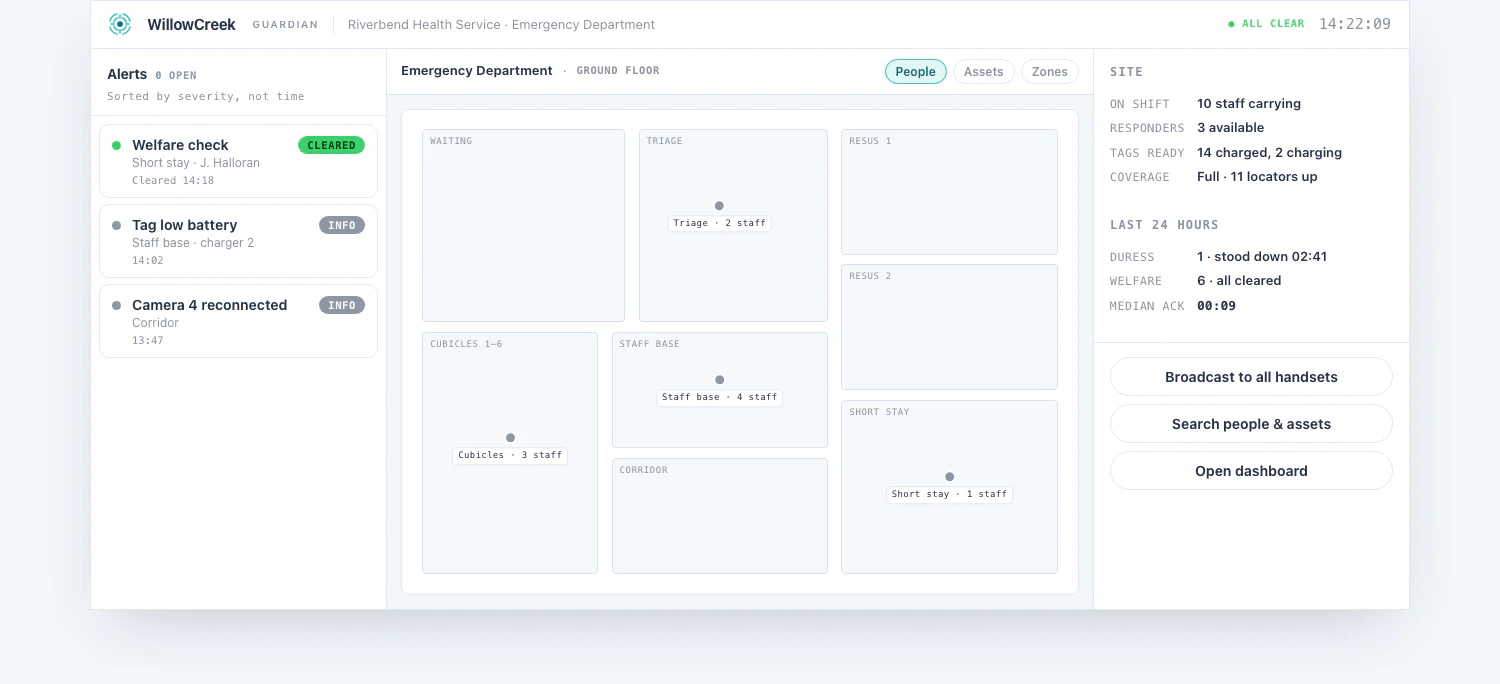
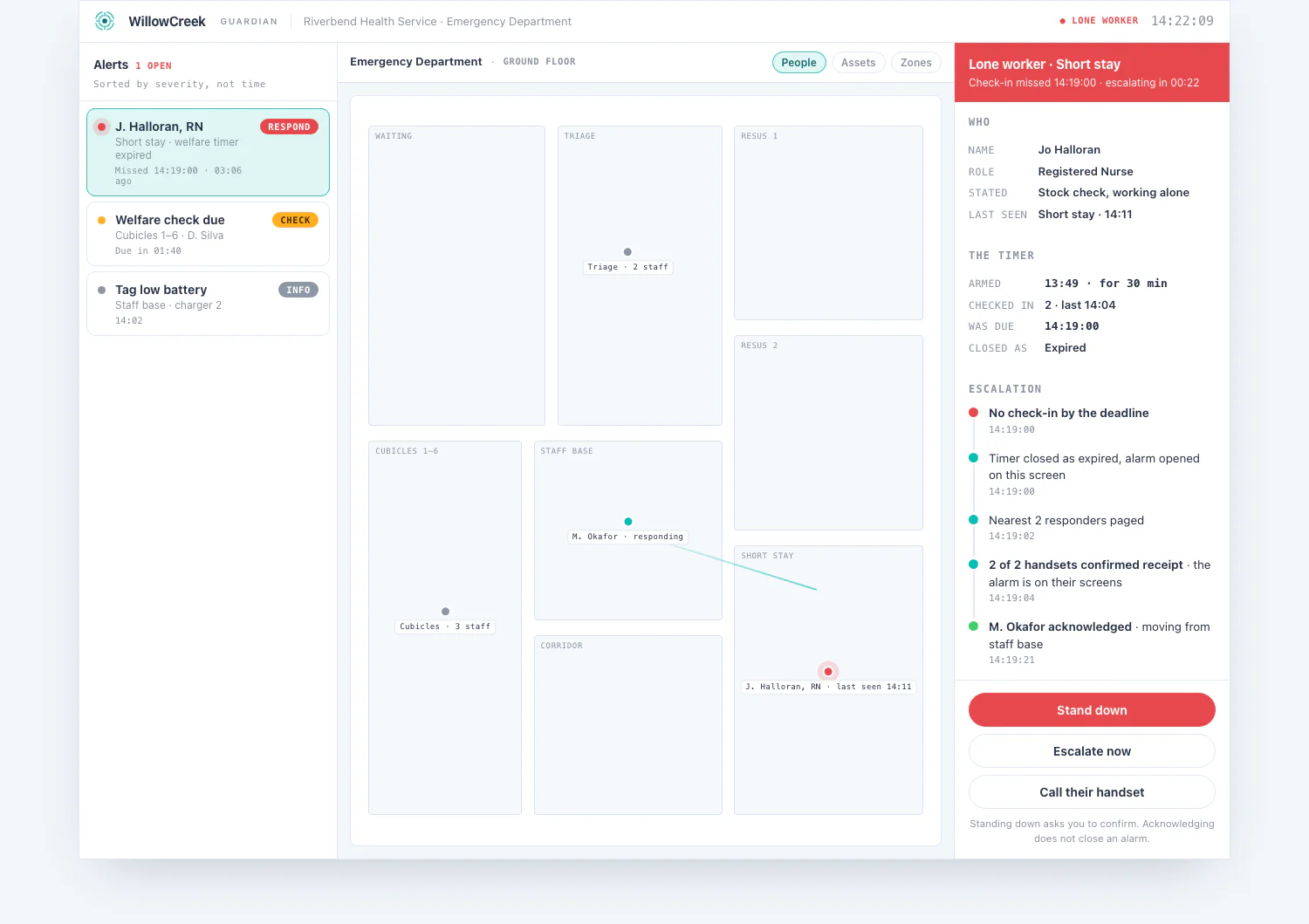
What an operator sees when a check-in is missed
One screen, four states. The console's job is watching a place, not reading numbers, which is why the floor plan is the permanent view and a dashboard is somewhere you visit rather than somewhere you sit.
Who is working alone right now
A live board: every person with a timer running, what they said they were doing, where, when it is due, and how long is left.
What happened
The register: every timer, what it ended in, and every individual check-in with its timestamp. Check-ins are stored as individual records rather than as a counter, because a counter can be incremented by anything.
Whether the watchdog is actually running
The console states when the backstop last completed a pass, how many timers it is watching, and whether it has failed. It exists so that "no alarms today" can be told apart from "nothing has been watching since Tuesday".
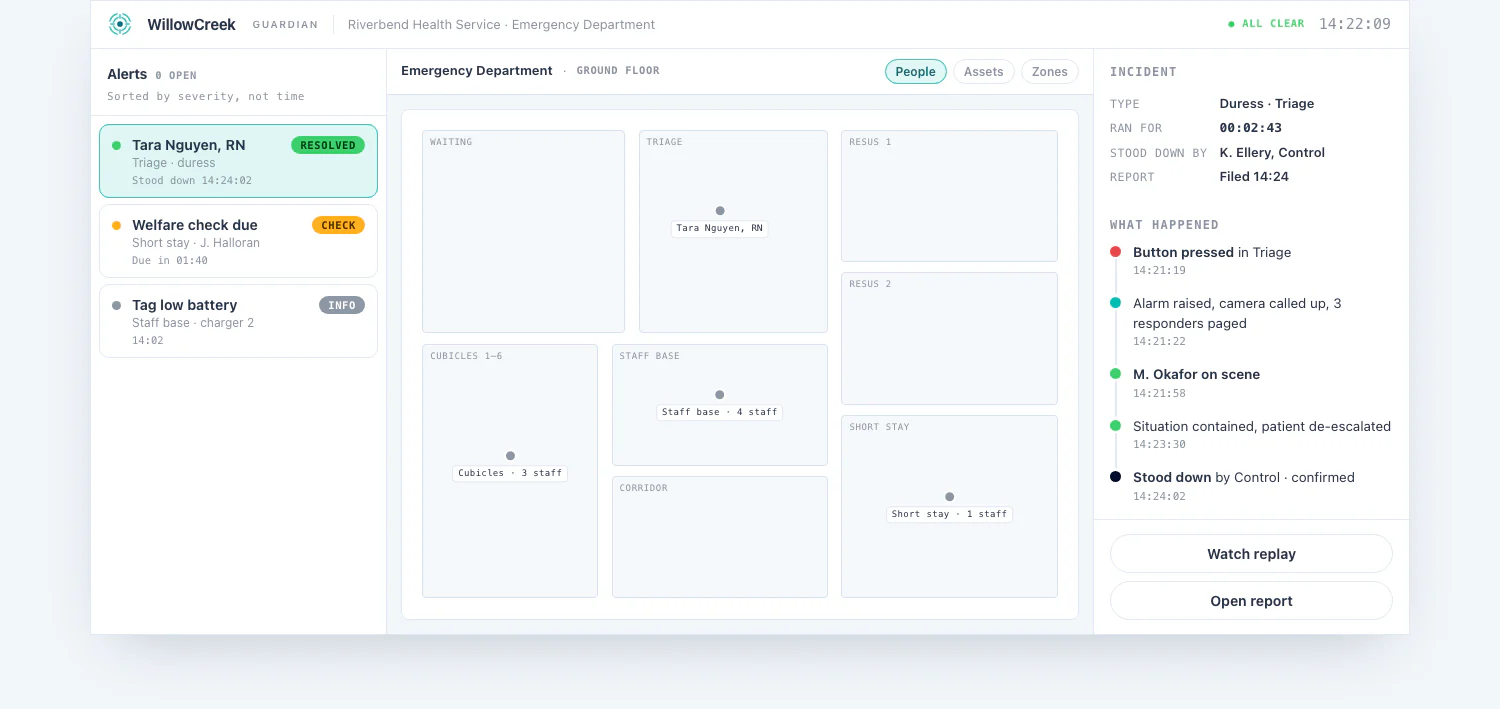
Console screens carry sample data. No person, site or incident shown is real.
What happens when a check-in is missed
A missed check-in becomes a lone worker incident, classified priority one at the moment it is created. That classification is fixed. No configuration setting, no rule and no field on any message can downgrade it after the fact. From there it enters the same ladder that carries a duress alarm.
- Tiers. Each tier names its recipients, resolved to people through the roster, and how long the platform waits before climbing. Tiers are defined per customer, and different areas can carry different ladders.
- Acknowledgement drives everything. The ladder climbs every window a human acknowledgement does not arrive. Acknowledgement is per recipient, so the record shows who actually took it, not just that somebody did.
- Absence escalates. Silence is never read as handled. An alarm nobody touches climbs, and it never lapses.
- Exhaustion is an event, not a shrug. If the ladder runs out of tiers without an acknowledgement, that is recorded as its own event and fires an out-of-band failsafe on an independent path, so a fault in the ordinary notification route cannot be the last word.
- Never merged, never batched, never delayed. A lone worker alarm is never rolled into another open alarm, never held back, never batched with anything. That is forbidden by design, and there is a test that fails if anyone reintroduces it.
- Stand-down when cleared. When the incident closes, outstanding notifications are stood down, and any that were still queued and never actually sent are marked as exactly that rather than quietly recorded as having gone out.
Notification channels available today are the control room console, webhook into an existing paging, task or messaging system, SMS through a configured gateway, and legacy paging over TAP and ESPA. How integrations attach →
Anyone can build a countdown
What follows separates a lone worker feature you can rely on from one that looks fine right up until it matters. These are the questions worth asking of every vendor, including this one.
- The deadline lives in the database, not in a timer. There is no in-process countdown anywhere in this feature. Servers restart: on every deployment, on every failover, on any crash. If pending timers lived in memory, a routine software update would silently disarm every running check-in on the site and nobody would be told. Here the deadlines are stored, and a sweep re-derives what is overdue every ten seconds. A restart delays the answer by one tick and cannot lose the question.
- The timer belongs to the person, not the handset. Key a check-in to a device and this becomes possible: person A picks up person B's phone, taps check in, and cancels B's timer. B is then alone with nothing watching them and a screen in the control room saying they are fine. Here a check-in can only ever answer the timer of whoever is signed in.
- The device can only ever say "I'm fine". A phone can answer a question. It can never report that it failed to answer one, because a phone that is flat, smashed, in a dead spot or in somebody else's pocket cannot report anything. Expiry is decided by the server, on a clock the handset cannot touch.
- Silence is never read as safety, in three separate places. A timer that ran out is recorded. A device that went quiet is recorded. And an expiry that fired but could not open an alarm, for whatever reason, is recorded loudly and put in front of an operator, because a closed record with no alarm behind it is a person nobody is coming for.
- Unknown is never read as safe. Where the platform cannot interpret something, it treats the person as needing attention rather than as fine. The person we can say least about must not be the one watched least.
- The worker is told they missed one. If a check-in is missed, the app says so plainly, including if the alarm itself failed to open. A missed check-in and a device going quiet are different things, and both say which they are. The operator reads "their device has not been heard from for four minutes", not a generic alarm.
A lone worker register is not ordinary operational data
It is a list of staff names against addresses and times, sometimes private residential ones, and it is not treated as ordinary operational data.
Reading the board, the register and the assurance surface requires a specific permission, held separately from the permission to send somebody an are-you-OK. A supervisor can be given the ability to see who is working alone without being given the ability to start buzzing them, and those are genuinely different grants.
Data is isolated at the database level, per customer and per site, enforced by the database rather than by application code remembering to filter. Where WillowCreek staff can be granted support access, that access is scoped and does not include the lone worker register.
Why we are specific about this.
In an earlier product we assessed, the write side of the welfare feature was locked down and both read sides were left open to any signed-in account, including a vendor support session from another company. Every worker's visit address, stated activity and full movement history was readable by anyone with a login. That was corrected on the way through rather than inherited.
Decisions a site makes before it runs this
These are real design questions rather than a features list, and they should be answered by the customer's own safety governance rather than by us. They belong at the start of a deployment, not the end.
How hard should a quiet phone shout?
Today a device going silent under a running timer raises a priority one, which in a responder's hands looks identical to a person collapsed on a floor. The argument for it is strong: an unreachable lone worker is exactly who this feature is for. The argument against is also strong. Where mobile coverage is not uniform, a site that generates several of these a week teaches its control room to treat the alarm class that matters most as "probably the battery again". That is alarm fatigue engineered into the product. The options are to raise as now, to raise at a lower priority with its own ladder, to raise only when the visit was also close to overdue, or to make the window configurable per site. It should be settled before a site with real coverage problems runs it.
What should the ladder look like for a missed check-in, as opposed to a duress?
Duress means come now. A missed check-out at 15:02 might mean the worker is fine and stuck in traffic. Same priority one classification, but the tiers, the waits and who gets called first are worth setting separately, against the site's own after-hours arrangements.
Should a late answer be possible?
Today it is not. Once the grace window closes, the alarm is open and the worker cannot retract it. Somebody who is fine but five seconds late causes an alarm they cannot stand down themselves. That is the safe default, and it is arguably the wrong default for a busy service. It is a decision, and it should be a conscious one.
Where should the alarm say the worker is?
For a visit at a private address, the alarm carries the address and the activity the worker nominated when they armed the timer. Indoor position, to the room, comes from RTLS infrastructure inside the customer's own buildings and does not apply at somebody's house. Live position from the phone itself, out in the field, is designed for and not yet wired. Where a live map fix on a mobile worker is a requirement rather than a preference, that changes the shape of a deployment and should be raised early.
How is it confirmed that a prompt actually arrived?
Today the platform records that a scheduled prompt or an are-you-OK was asked. That it reached the handset is not yet independently confirmed. The transport to do it exists in the product and carries duress traffic; it does not yet carry check-in traffic. Until it does, the honest position is "asked, delivery unconfirmed", and that is how it is reported.
On your infrastructure, or cloud-hosted
One code image, two ways to run it. As a dedicated appliance on the customer's own infrastructure, one per customer, with individual sites as separated tenants underneath and the data staying on the customer's own kit. Or cloud-hosted, the same image and the same tenancy model, for customers who would rather not run hardware. The choice does not change the product, the console or the escalation path.
| Deployment | Dedicated on-premises appliance, one per customer, or cloud-hosted |
| Cloud | The same code image, run as a cloud-hosted system rather than on customer hardware |
| Tenancy | Sites as separated tenants, isolated at the database, in either shape |
| Handset | iOS and Android, themed per customer |
| Indoor position | RTLS, vendor-agnostic adapter model |
| Outdoor position | Satellite positioning on the handset |
| Notification channels | Console, webhook, SMS gateway, TAP and ESPA paging |
| Integration | Webhook out, REST API, event stream |
Ask us the five questions on this page
A working session on the go-live decisions, so they get asked of every vendor under evaluation rather than only this one. Or a walkthrough of the control room, the register and the assurance screen.